A step-by-step guide to building a modern WordPress block theme with theme.json, HTML templates, template parts, patterns, 30+ custom blocks, and a custom Webpack + PHP asset pipeline.
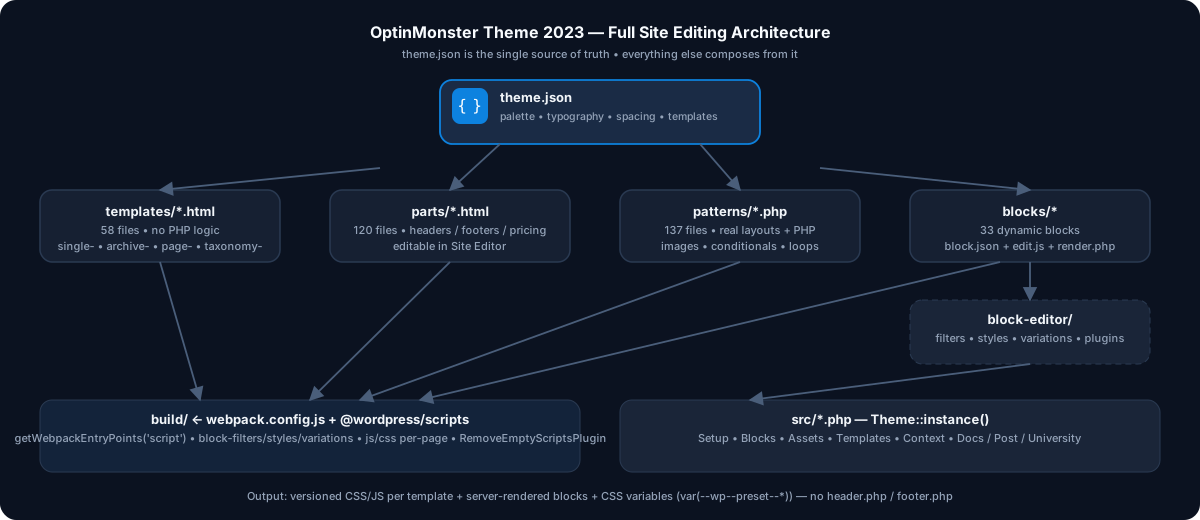
This is exactly how optinmonster-theme-2023 powers optinmonster.com — full FSE from header to footer. No header.php, no footer.php, no classic loop.
1. Scaffold the Block Theme
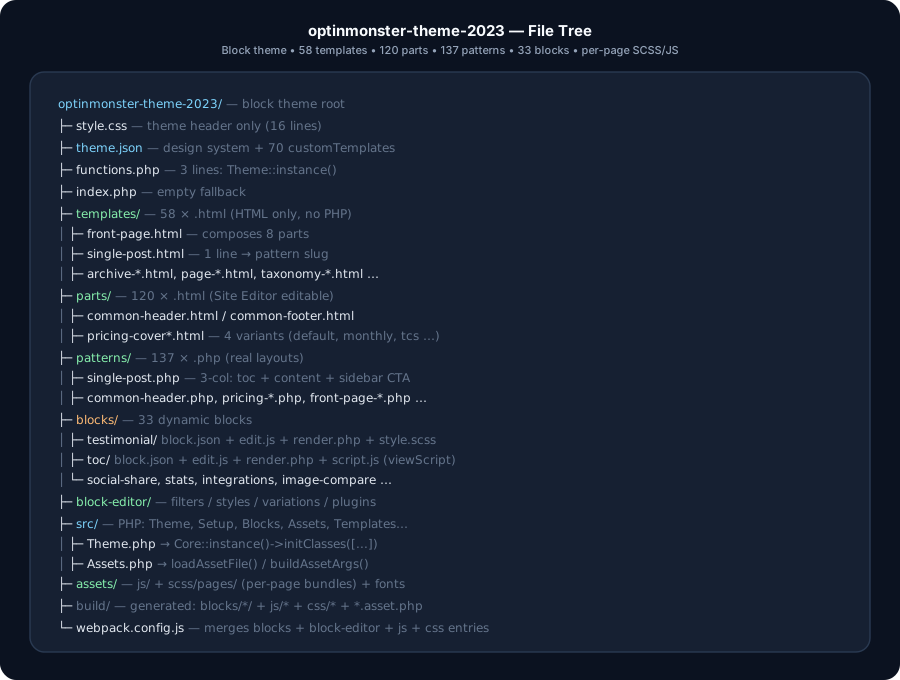
A block theme has two required files: style.css and templates/index.html. Everything else in this structure is optional and added according to the project's needs.
theme/

├── style.css              # required theme metadata

├── theme.json             # design system + editor configuration

├── functions.php          # optional PHP bootstrap

├── templates/             # block templates (*.html)

├── parts/                 # template parts (*.html)

└── patterns/              # block patterns (*.php)
style.css:
/**

 * Theme Name: OptinMonster Theme 2023

 * Requires at least: 6.0

 * Requires PHP: 7.3.5

 * Text Domain: optinmonster

**/
functions.php — single bootstrap line:
require_once __DIR__ . '/vendor/autoload.php';

use AwesomeMotive\OptinMonster2023;


OptinMonster2023\Theme::instance();
templates/index.html: required. This is the default/fallback block template, and its presence is what makes WordPress recognize the theme as a block theme. An index.php file is not required for a block theme. We kept an empty index.php only if this project needed legacy/hybrid compatibility; it is not part of the FSE requirement.
2. Define the Design System in theme.json
All colors, fonts, and spacing become theme presets and styles that WordPress exposes to the editor and, where applicable, as CSS variables. We disabled selected Core defaults for this project to enforce OptinMonster's brand system. For a new project, curate only the controls you actually want to expose rather than disabling everything by default.
Key settings:
{

  "version": 3,

  "$schema": "https://schemas.wp.org/wp/6.6/theme.json",

  "settings": {

    "appearanceTools": true,

    "color": { "defaultPalette": false, "palette": [...] },

    "layout": { "contentSize": "1200px", "wideSize": "1200px" },

    "typography": { "fluid": true, "fontFamilies": [...], "fontSizes": [...] }

  }

}
What we did specifically:
Palette: Neutral 50-900, Primary 50-900, Secondary, Error, Warning, Success + Black/White. Example:
{ "color": "#0D82DF", "name": "Primary 500", "slug": "primary-500" }This generates var(--wp--preset--color--primary-500) and classes like .has-primary-500-background-color automatically.
Fonts: self-hosted Museo-Sans via fontFace:
{

  "fontFamily": "Museo-Sans, sans-serif",

  "slug": "museo-sans",

  "fontFace": [{

    "fontWeight": "400 500",

    "src": ["file:./assets/fonts/MuseoSans-500.woff2"]

  }]

}
Fluid sizes:
tiny:12px→ginormous: clamp 42-72px. Headings mapped instyles.elements:
"styles": {

  "elements": {

    "h1": { "typography": { "fontSize": "var(--wp--preset--font-size--colossal)", "fontWeight": "900" } }

  }

}
Register templates + parts declaratively:
"customTemplates": [

  { "name": "single-post", "postTypes": ["post"], "title": "Single item: Post" },

  { "name": "single-om_features", "postTypes": ["om_features"], "title": "Single item: Feature" },

  { "name": "page-pricing", "title": "Page: Pricing" }

],

"templateParts": [

  { "area": "header", "name": "common-header", "title": "Common Header" },

  { "area": "footer", "name": "common-footer", "title": "Footer" }

]
We have ~70 customTemplates and ~35 templateParts. This is what makes every CPT, pricing variant, site page selectable in Site Editor.
3. Build Templates as HTML, Not PHP
templates/single-post.html is one line:
<!-- wp:pattern {"slug":"optinmonster/single-post"} /-->templates/front-page.html composes parts:
<!-- wp:template-part {"slug":"header-home-lp","theme":"optinmonster-theme-2023","tagName":"header"} /-->

<!-- wp:template-part {"slug":"front-page-cover-home-lp","theme":"optinmonster-theme-2023"} /-->

<!-- wp:template-part {"slug":"front-page-trusted-by-home-lp","theme":"optinmonster-theme-2023"} /-->

<!-- wp:template-part {"slug":"front-page-steps-home-lp","theme":"optinmonster-theme-2023"} /-->

<!-- wp:template-part {"slug":"footer-home-lp","theme":"optinmonster-theme-2023","tagName":"footer"} /-->
Rules we follow:
Templates should be kept thin and compositional. They can contain ordinary Core blocks, dynamic blocks, template-part, and pattern blocks. In this project, we kept them especially thin by composing most sections through parts and patterns.
Reusable markup belongs in patterns, while server-side/request-time logic belongs in dynamic blocks or render callbacks. PHP inside pattern files is useful for registration-time tasks such as asset URLs and generated markup, but patterns are registered on init, so PHP in a pattern should not be treated like a request-time PHP template.
archive-*.html,single-*.html,page-*.html,taxonomy-*.html,category-*.html,404.html,search.html,home.htmlcover full hierarchy. 58 files total.
Custom hierarchy tweaks in PHP (src/Blocks.php):
public function singleTemplateHierarchy( $templates ) {

  if ( has_category( 'case-studies' ) ) {

    array_splice( $templates, 1, 0, 'single-post-case-studies.html' );

  } elseif ( has_category( 'announcements' ) ) {

    array_splice( $templates, 1, 0, 'single-post-announcements.html' );

  }


  return $templates;

}
Nested page URLs such as /pricing/monthly were handled in this project with custom template-hierarchy logic. This is project-specific behavior, not native URL-to-template mapping. The alternative is to use WordPress's normal page/template hierarchy wherever possible and add a hierarchy filter only when a business requirement needs a custom mapping:
add_filter( 'page_template_hierarchy', [ $this, 'overrideNestedPageTemplate' ] );

// /pricing/monthly -> page-pricing-monthly.html
4. Break Reusable UI into Template Parts
parts/ = 120 HTML files. Headers, footers, pricing tables, front-page sections per campaign variant (-contentcamp, -tcs, -wp, -powered-by, etc.).
Example: pricing has 4 cover variants sharing the same template slot:
parts/pricing-cover.html

parts/pricing-cover-monthly.html

parts/pricing-cover-affiliate1.html

parts/pricing-cover-affiliate12.html
Parts are pure block markup — editable in Site Editor > Template Parts. No PHP needed unless dynamic.
5. Implement Real Layouts as Block Patterns
137 patterns in patterns/*.php. Templates reference them; editors insert them.
Header:
<?php

/***

 * Title: Single: Post

 * Slug: optinmonster/single-post

 * Categories:

 * Inserter: no

 **/

?>


<!-- wp:template-part {"slug":"common-header","theme":"optinmonster-theme-2023"} /-->

    <!-- wp:group {"align":"full","backgroundColor":"primary-50"} -->

        <div class="wp-block-group alignfull has-primary-50-background-color has-background"></div>

    <!-- /wp:group -->


    <!-- wp:om-blocks/toc {"title":"In This Article"} /-->

    <!-- wp:post-content /-->

    <!-- wp:pattern {"slug":"optinmonster/free-guides"} /-->

<!-- wp:template-part {"slug":"common-footer","theme":"optinmonster-theme-2023"} /-->
Why PHP patterns in this project:
Generate values known at pattern registration time, such as theme-relative asset URLs or translated/generated markup.
Do not use pattern PHP for request-time conditions such as
get_the_date()oris_page(). Patterns are registered on init, so this PHP is not a request-time template. For request-time logic, use a dynamic block or server-side render callback.The original conditional-date example was request-time logic, so it should be moved into a dynamic
block/rendercallback rather than kept in the pattern.Inserter: no hides layout-only patterns from inserter; Categories: groups the rest (optinmonster-front-page, optinmonster-pricing, optinmonster-docs, etc. registered in
Blocks::registerBlockPatternCategories()).
6. Create Dynamic Blocks: block.json + edit.js + render.php
33 custom blocks under blocks/: testimonial, toc, social-share, stats, seo-content, integrations, testimonials-slider, image-compare, etc.
A typical React-powered dynamic block may contain these files; the exact set depends on the block:
blocks/testimonial/

├── block.json

├── index.js      # registerBlockType

├── edit.js       # React editor UI

├── render.php    # PHP server render

└── style.scss    # front + editor
block.json (dynamic block):
{

  "apiVersion": 3,

  "name": "om-blocks/testimonial",

  "title": "Testimonial",

  "category": "om-blocks",

  "attributes": {

    "author": { "type": "string" },

    "content": { "type": "string" },

    "gravatar": { "type": "string" },

    "featuredImagePosition": { "type": "string", "default": "Below" }

  },

  "supports": { "align": ["wide","full"], "html": false },

  "editorScript": "file:./index.js",

  "style": "file:./style-index.css",

  "render": "file:./render.php"

}
index.js:
import { registerBlockType } from '@wordpress/blocks';

import metadata from './block.json';

import edit from './edit';

import './style.scss';


registerBlockType(metadata.name, {

  edit,

  save: () => null // dynamic: PHP renders*

});
edit.js: useBlockProps, RichText, PlainText, InspectorControls. Example — pull the current post's featured image through the WordPress data store:
const featuredImage = useSelect((select) => {

  const id = select('core/editor').getEditedPostAttribute('featured_media');

  return id ? select('core').getMedia(id) : null;

}, []);


<InspectorControls>

  <PanelBody title="Author Email">

    <TextControl value={authorEmail} onChange={(authorEmail) => setAttributes({authorEmail})} />

  </PanelBody>

</InspectorControls>


<RichText value={content} onChange={(content) => setAttributes({content})} />
render.php: escaped server output:
<?php

    $author   = $attributes['author'] ?? '';

    $gravatar = $attributes['gravatar'] ?? '';

    $content  = $attributes['content'] ?? '';

?>


<div class="wp-block-om-blocks-testimonial">

  <h3><?php echo wp_kses_post( $content ); ?></h3>

  <p><?php echo esc_html( $author ); ?></p>

  <?php if ( $gravatar ) : ?>

    <img src="<?php echo esc_url( $gravatar ); ?>" alt="<?php echo esc_attr( $author ); ?>" />

  <?php endif; ?>

</div>
Auto-registration — no manual list (src/Blocks.php). This approach is valid for the project; with a large block library, a generated blocks manifest can also be used in newer WordPress tooling to reduce filesystem scanning overhead:
public function blocksInit() {

  $folders = array_filter( glob( get_stylesheet_directory() . '/build/*' ), 'is_dir' );

  foreach ( $folders as $folder ) {

    $blockJson = $folder . '/block.json';

    if ( file_exists( $blockJson ) ) {

      register_block_type_from_metadata( $blockJson );

    }

  }

}
7. Server-Side Dynamic Example: TOC Block
om-blocks/toc parses H2s from post content with DOMDocument:
$title = $attributes['title'] ?? 'In this Article';

$post  = get_post();

$dom   = new DOMDocument();


libxml_use_internal_errors( true );

$dom->loadHTML( $post->post_content );


$headings = [];

foreach ( $dom->getElementsByTagName( 'h2' ) as $heading ) {

  $headings[] = $heading;

}


if ( count( $headings ) ) : ?>

<div <?php echo get_block_wrapper_attributes(); ?>>

  <div class="docs-single-sidebar-title"><?php echo esc_html( $title ); ?></div>

  <ul>

  <?php foreach ( $headings as $heading ) :

    $id = $heading->attributes->getNamedItem( 'id' );

    if ( empty( $id ) ) continue; ?>

    <li class="toc-item" data-id="<?php echo esc_attr( $id->textContent ); ?>">

      <a href="#<?php echo esc_attr( $id->textContent ); ?>">

        <?php echo esc_html( $heading->nodeValue ); ?>

      </a>

    </li>

  <?php endforeach; ?>

  </ul>

</div>

<?php endif;
Paired with viewScript: file:./script.js for scroll-spy + editorStyle/style for sidebar styling. Used in single-post, docs, guides.
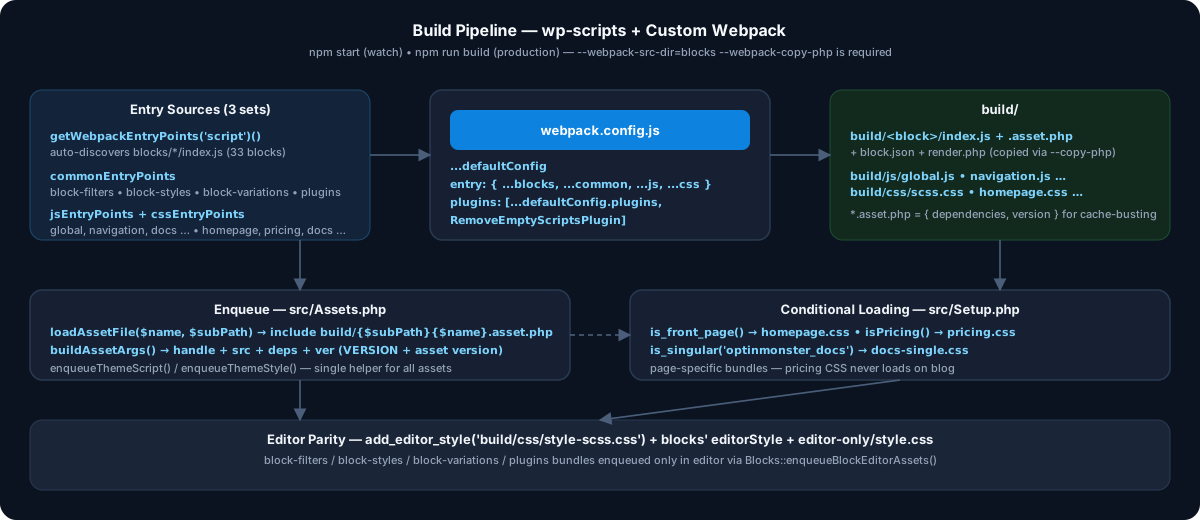
8. Wire the Build: @wordpress/scripts + Custom Webpack
package.json:
{

  "scripts": {

    "build": "wp-scripts build --webpack-src-dir=blocks --webpack-copy-php",

    "start": "wp-scripts start --webpack-src-dir=blocks --webpack-copy-php"

  }

}
--webpack-copy-php is critical — copies render.php + block.json to build/.
webpack.config.js merges three entry sets:
const { getWebpackEntryPoints } = require('@wordpress/scripts/utils/config');

const RemoveEmptyScriptsPlugin  = require('webpack-remove-empty-scripts');


const commonEntryPoints = {

  'block-filters': './block-editor/block-filters',

  'block-styles': './block-editor/block-styles',

  'block-variations': './block-editor/block-variations',

  plugins: './block-editor/plugins',

};


const jsEntryPoints = {

  global: './assets/js/global.js',

  navigation: './assets/js/navigation.js',

  docs: './assets/js/docs.js',

  'single-post': './assets/js/single-post.js',

};


const cssEntryPoints = {

  scss: './assets/scss/style.scss',

  homepage: './assets/scss/pages/homepage.scss',

  pricing: './assets/scss/pages/pricing.scss',

  docs: './assets/scss/pages/docs.scss',

};


module.exports = {

  ...defaultConfig,

  entry: {

    ...getWebpackEntryPoints('script')(), // auto-discovers blocks/*index.js*

    ...commonEntryPoints,

    ...prepareEntryPointPath(jsEntryPoints, 'js'),

    ...prepareEntryPointPath(cssEntryPoints, 'css'),

  },


  plugins: [

    ...defaultConfig.plugins,

    new RemoveEmptyScriptsPlugin({ stage: RemoveEmptyScriptsPlugin.STAGE_AFTER_PROCESS_PLUGINS }),

  ],

};
RemoveEmptyScriptsPlugin deletes empty .js stubs from SCSS-only entries.
Asset loading helper (src/Assets.php) reads .asset.php for version/deps:
public static function enqueueThemeScript( $assetName, $subPath = '', $args = [] ) {

  $asset     = self::loadAssetFile( $assetName, $subPath ); // build/js/global.asset.php*

  $assetArgs = self::buildAssetArgs( $assetName, $asset, 'js', $subPath );


  wp_enqueue_script( $assetArgs['handle'], $assetArgs['src'], $assetArgs['deps'], $assetArgs['ver'], $args );

}
Conditional per-page CSS/JS (src/Setup.php) — only load what the template needs:
if ( is_front_page() ) {

  Assets::enqueueThemeStyle( 'homepage', 'css/' );

} elseif ( container( 'pages' )->isPricing() ) {

  Assets::enqueueThemeStyle( 'pricing', 'css/' );

} elseif ( is_singular( 'optinmonster_docs' ) ) {

  Assets::enqueueThemeStyle( 'docs-single', 'css/' );

}
9. Extend the Editor Without Forking Core
block-editor/ compiled as separate bundles, enqueued only in editor (Blocks::enqueueBlockEditorAssets()):
// block-editor/block-filters/index.js*

import './icons';

import './negative-input-controls';

import './template-parts';

import './paragraph-tooltip';
What each does:
block-filters:
addFilter('blocks.registerBlockType')for defaults, custom toolbar controls.block-styles:
registerBlockStyle()— e.g.is-style-arrow-link,is-style-plain-categories.block-variations: PHP-registered too — arrow/download buttons:
$args['variations'] = [[

  'name' => 'arrow-buttons',

  'title' => 'Arrow Buttons',

  'attributes' => ['className' => 'arrow-buttons'],

]];
plugins:
registerPlugin()sidebar panels, e.g.,template-partlocking.
Custom category so all blocks are discoverable:
public function addNewBlockCategory( $block_categories ) {

  return array_merge( $block_categories, [[

    'slug' => 'om-blocks',

    'title' => esc_html__( 'OptinMonster Blocks', 'optinmonster-theme-2023' ),

  ]]);

}
10. PHP Architecture: Focused Classes and Explicit Dependencies
src/

├── Theme.php      # bootstrap

├── Setup.php      # supports, constants, global enqueues

├── Blocks.php     # registration, categories, variations, render filters

├── Assets.php     # versioned enqueue helper

├── Templates.php  # rewrite + REST proxy

├── Context.php    # request context (DI container)

├── Docs.php / Post.php / University.php / LearnDash.php
Theme.php:
class Theme {

  use Singleton;


  protected function __construct() {

    Core::instance()->initClasses([

      Setup::class, LearnDash::class, Blocks::class,

      Templates::class, Context::class, University::class,

      Docs::class, Post::class,

    ]);

  }

}
Each class has init() → hooks(). Namespace: AwesomeMotive\OptinMonster2023. This kept functions.php small and separated project concerns. The singleton/container pattern shown here is a project-specific architecture choice, not a WordPress FSE requirement. For new code, prefer focused classes with explicit dependencies; use a container or singleton only where it genuinely simplifies the application.
Two high-leverage examples:
a) Navigation active state (no JS):
add_filter( 'render_block_core/navigation-link', [ $this, 'renderBlockCoreNavigationLink' ], 10, 2 );

// compares $block['attrs']['url'] to $_SERVER['REQUEST_URI'], injects .om-nav-link-active*
b) Templates React app proxy + caching:
add_rewrite_rule( 'templates/([^/]+)/?$', 'index.php?pagename=templates&template=$matches[1]', 'top' );

register_rest_route( 'omapp-proxy/v1', '/templates', [

  'callback' => [ $this, 'handleFetchTemplates' ],

]);

// fetches OM_APP_URL v2/templates, strips unused fields, set_transient(..., DAY_IN_SECONDS)*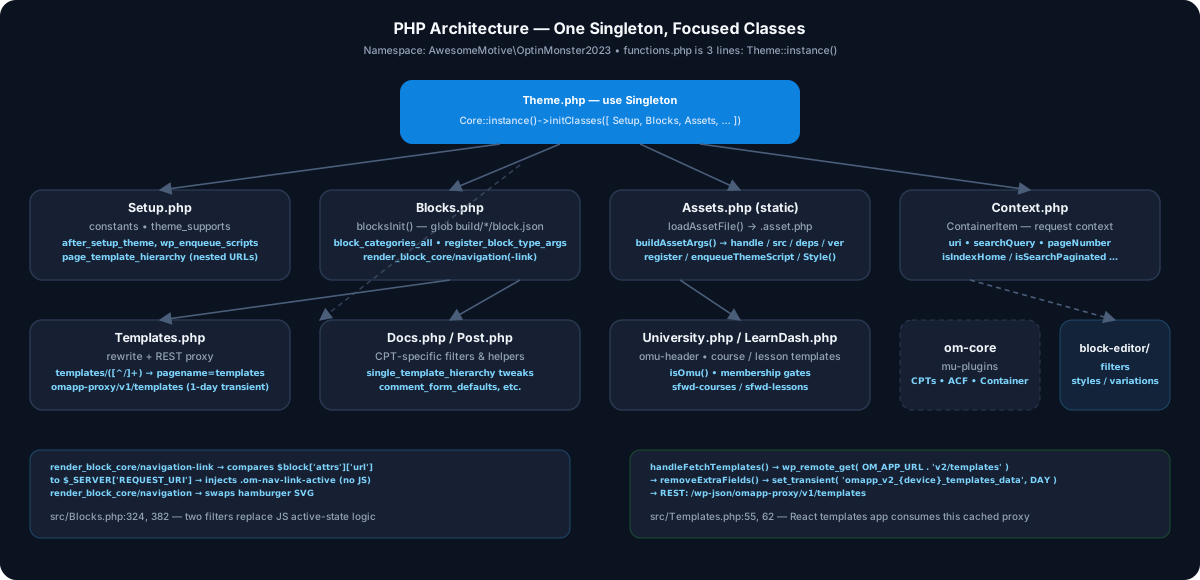
11. Styling: Global + Per-Page SCSS + Editor Parity
assets/scss/pages/

├── homepage.scss  blog.scss  pricing.scss

├── docs.scss  university.scss  ...
Global style.scss was enqueued everywhere and added to the editor for this project to keep editor/front-end parity.
Updated approach: prefer theme.json for global design tokens and block styles, and use each block's block.json asset fields for block-specific CSS. Use style when CSS is needed in both editor and frontend, and viewStyle when it is frontend-only.
Per-page bundles are still useful for genuinely page-specific application CSS; keep them conditional when they cannot be expressed cleanly as block/theme styles.
editor-only/style.cssfixes editor-only chrome.supports.spacing.margin/padding,color.background/textper-block inblock.jsonexposes UI controls instead of custom CSS.
Run:
npm start        # watch blocks/ + assets

npm run build    # production

npm run lint:js  # eslint

npm run lint:css # stylelint
12. Modern FSE Additions
Style Variations
For themes that need alternate visual systems, add /styles/*.json theme style variations instead of creating separate themes or duplicating templates.
Block Bindings
Before creating a custom React block just to display custom data, check whether Block Bindings can connect existing Core blocks to the required data source. This can keep the editor experience closer to native WordPress blocks.
Block Locking
Inserter: only controls whether a pattern appears in the inserter. For curated layouts, use the Block Locking API and, where appropriate, template locking so editors can change content without accidentally breaking the intended structure.
Block assets
Prefer block.json for block-specific assets. Use style for CSS shared by editor and frontend, and viewStyle for frontend-only CSS. For large block libraries, consider the blocks-manifest workflow supported by modern @wordpress/scripts.
13. Checklist to Replicate This
Start with the two required block-theme files: style.css and templates/index.html. Add theme.json immediately for a serious FSE project.
Use theme.json v3 when the project's minimum WordPress version supports it; curate palette, typography, spacing, layout, and editor controls rather than relying on large amounts of custom CSS.
Create a thin templates/index.html and add more templates only where the design or content hierarchy requires them.
Use parts/ for reusable site regions such as headers and footers, and /patterns for reusable block compositions.
Add customTemplates entries for genuinely custom templates associated with CPTs or other project-specific template choices.
Scaffold custom blocks only when Core blocks, patterns, bindings, variations, or block styles cannot reasonably provide the required behavior.
Use
save: () => null+render.phpfor genuinely server-rendered dynamic blocks.Use
block.jsonfor block metadata and assets; useviewStylefor frontend-only styles and consider the blocks-manifest workflow for large libraries.Extend Core through filters, styles, variations, bindings, and plugins rather than forking Core blocks.
Keep PHP organized by concern. The project's singleton/container architecture is one valid option, but it is not an FSE requirement.
That's the modern loop: design system → templates → parts → patterns → Core blocks/bindings → custom blocks where necessary → server-side rendering → optimized assets.